











The New Route Advisor: Why and How It’s Evolving
For more than a decade, the Route Advisor has been a constant companion on the road. It has accompanied drivers for thousands of hours, countless deliveries, and more than a few challenging parking attempts. Changing something so familiar is never a small decision. The team at SCS Software did not take it lightly.
Why Change the Route Advisor?
Over the years, the core truck driving experience has grown deeper and more detailed. Trucks gained more systems. Driving assists became more nuanced. Screen sizes varied for different players, and control methods expanded from keyboards to wheels and gamepads.
The original Route Advisor served the community well for a long time. However, it was reaching a point where it could no longer grow without becoming cluttered, unclear, or restrictive. Adding more information into a single panel meant compromises: hidden states, missing feedback, and tab switching while driving.
The goal with the new Route Advisor redesign was not to change how drivers enjoy trucking. The goal was to make information while driving:
- Clear
- Immediate
- Unambiguous
- Adaptable to individual playstyles
What you see now is the foundation of that change.
From One Panel to Many: A Widget-Based Advisor
Instead of one compact panel trying to do everything, the new Route Advisor is built from individual widgets. Each widget has a single, clear purpose.
This shift allows three important improvements for truck drivers:
- Show more driving-critical information without crowding
- Give clear feedback on what the truck is actually doing
- Let drivers decide what stays on screen and what doesn’t
Each widget can be enabled or disabled independently. Drivers can choose whether it appears in the interior view, the exterior view, both, or not at all.
For those who prefer a minimal, immersive screen, that option exists. For those who want more at-a-glance feedback, that option exists too. The F3 key still toggles all UI elements off while notifications remain visible.

Driving-Critical Information, Front and Centre
One of the biggest focuses was improving feedback while driving. This is especially important for information that was previously missing, unclear, or only available in limited views.
What is now more visible and easier to read:
- Speed
- Selected gear
- Fuel status
- Time to rest
What is now displayed for the first time:
- Engine RPM
- Exact time until rest is required
- Time remaining to complete a delivery
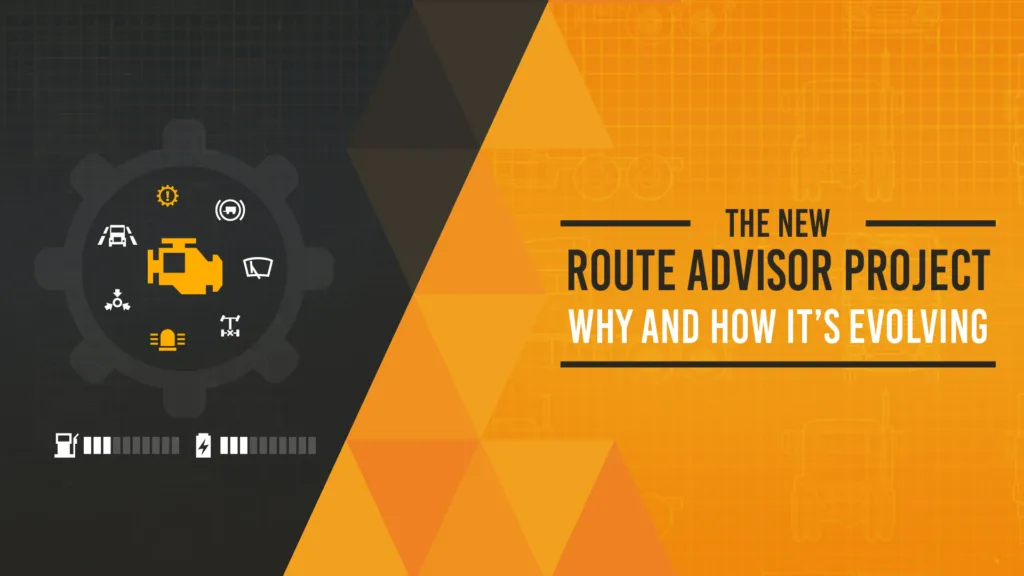
- Truck systems indicators

This information is available whether driving from the cabin or using an exterior camera. Drivers never have to guess what their truck is doing.
Clear Feedback on Truck Systems
Modern trucks rely on many active systems. Until now, it wasn’t always obvious which ones were on, off, or partially engaged.
The new Indicators widget provides immediate visual feedback for systems such as:
- Cruise control (including its settings)
- Engine brake and retarder levels
- Lane assist and lane departure warning
- Lights, high beams, hazards, beacons
- Parking brake, trailer brake, differential lock
- Wipers and air brake pressure
Icons appear only when systems are active. This keeps the screen clean while ensuring nothing important is hidden.


A Better Way to Understand Damage
Damage feedback has also been reworked. Previously, damage was shown mainly as percentages. Those numbers didn’t always explain what that damage actually meant.
Now, instead of an abstract value, the UI shows when a system is damaged enough to start malfunctioning. This means:
- Drivers don’t just know that something is damaged
- They know when new damage occurs, with the change clearly highlighted
- They know when it will start affecting how the truck behaves
This provides clearer feedback and a better sense of urgency without unnecessary distraction.

Notifications That Inform Without Overwhelming
Notifications now live in a dedicated area of the screen. They are colour-coded by importance:
- Alerts
- Warnings
- Announcements
Only one notification appears at a time. This helps drivers stay informed without flooding the view. It also prevents important messages from fighting for attention in multiple places.
Automatic Parking, Refined
Automatic parking assistance has been redesigned to be less intrusive and more optional. Instead of repeated reminders in a distracting block of text, it now appears as a small, dedicated widget. It subtly communicates the option clearly. Experienced drivers can disable it entirely.

The Role of the Quick Info Menu
Some information has been intentionally moved away from the live driving HUD to reduce distraction:
- Detailed job information
- Damage percentages
- Vehicle adjustments and services
This information is now centralized in the Quick Info menu, alongside:
- Control references
- Easier access to settings
- Photo mode
- Widget options
- Local regulations
The intent is clear separation: the driving HUD contains what drivers need while driving, and the Quick Info menu holds deeper context and configuration.

This Is a Foundation, Not a Final Step
The team wants to reassure everyone that the new Route Advisor will continue to be improved. Additional widgets, refinements, and customization options are all possible because of this new foundation. The intention is to get this right for everyone.
Looking Ahead
Change is always hardest at first, especially when it touches something as familiar as the Route Advisor. The team understands the community’s concerns, the strong reactions, and the passion behind them. That passion about the game is exactly why the team cares so deeply about getting this right.
The commitment is simple:
- Preserve the heart of truck driving
- Improve clarity, driving awareness, and immersion
- Keep making this system better with the community, not without it
Thank you for taking the time to read this and share your thoughts. Thank you for continuing to travel on this incredible journey with the team and the game we all love.
We’ll see you on the road.





Leave a Reply